

Website Accessibility Audit

The National Football League (NFL) Foundation Website ​— WCAG 2.1 (Level AA)

Screen reader friendly pdf 

Overview

This case study presents an accessibility audit of the NFL Foundation website, evaluated against WCAG 2.1 Level AA standards. The audit focused on identifying barriers that could prevent users with visual, motor, or cognitive disabilities from fully accessing content and functionality.

The goal was not only compliance, but practical usability improvements that support inclusive access for all users.

Audit Scope & Standards

  • Guidelines: WCAG 2.1
  • Conformance Level: AA
  • Principles Evaluated: Perceivable, Operable, Understandable, Robust (POUR)

Testing Methods

A combination of automated and manual testing methods was used to capture both technical issues and real-world usability barriers.


Automated (WAVE)

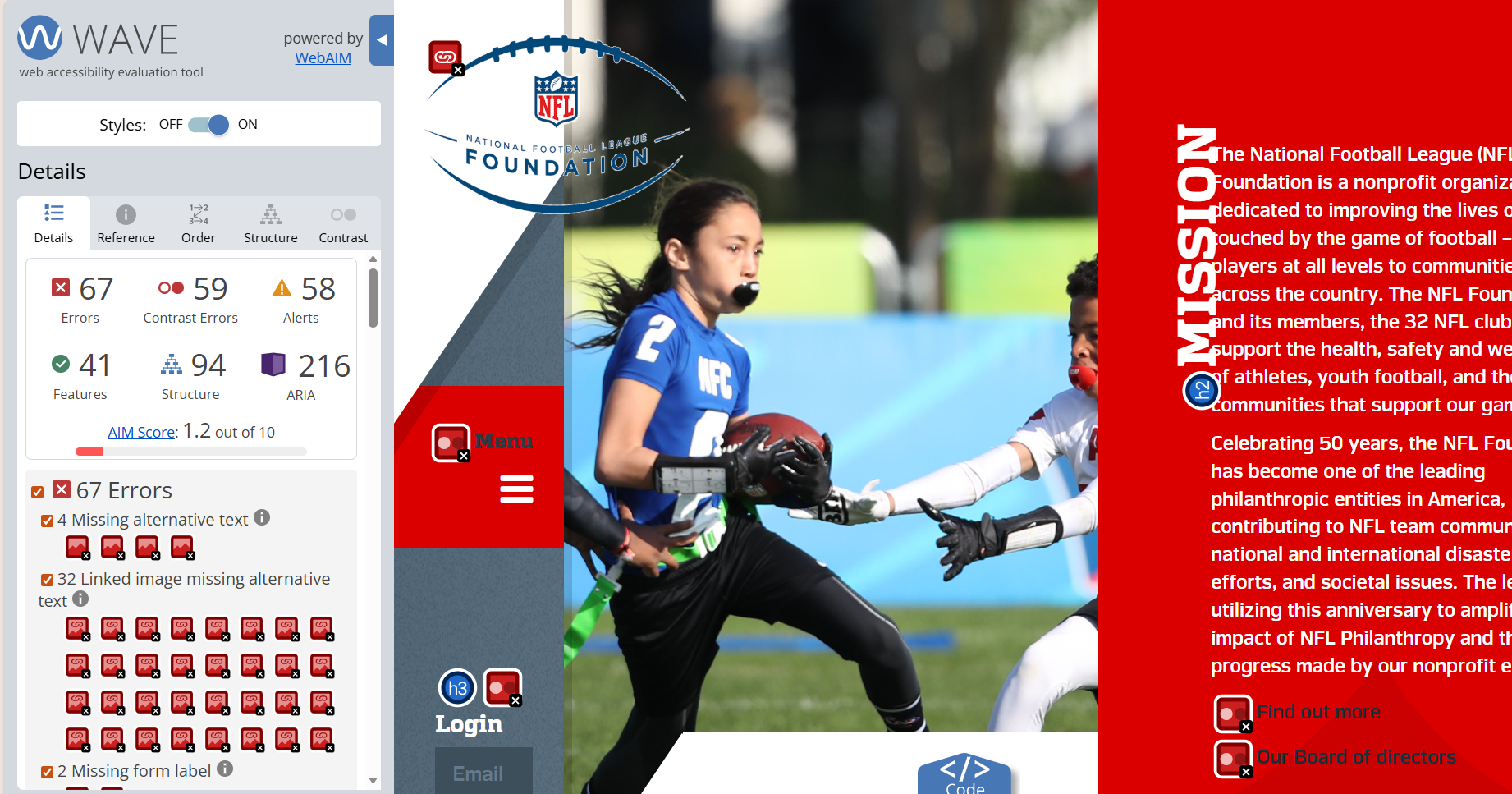
Identified missing alt text, color contrast failures, missing form labels, and ARIA landmark issues.


Keyboard Navigation

Evaluated logical tab order, focus visibility, and access to all interactive elements without a mouse.


Screen Reader

Assessed whether links, buttons, headings, and landmarks were announced clearly and in a logical structure.


Magnification (200%)

Tested layout stability, readability, and horizontal scrolling at increased zoom levels.
Key Accessibility Findings

1. Color Contrast Issues

Impact

Low contrast between text and background makes content difficult to read for users with low vision or color perception differences.

Relevant ​WCAG Guideline

1.4.3 Contrast (Minimum) — Level AA

2. Keyboard Navigation & Link Clarity

Impact

Unclear or missing labels on links and buttons create barriers for keyboard and screen reader users, making navigation inefficient or confusing.

Relevant ​WCAG Guideline

  • 2.1.1 Keyboard — Level A
  • 2.4.4 Link Purpose (In Context) — Level A
  • 2.1.2 No Keyboard Trap — Level A

3. Page Structure & Semantic Markup

Impact

Inconsistent heading hierarchy and insufficient ARIA labeling make it difficult for assistive technology users to understand page structure and relationships.

Relevant ​WCAG Guideline

  • 4.1.2 Name, Role, Value — Level A
  • 2.4.6 Headings and Labels — Level AA

Recommendations

Improve Color Contrast

  • Ensure text and image-based text meet a minimum contrast ratio of 4.5:1
  • For large text, maintain at least 3:1
  • Avoid placing light text on light backgrounds or dark text on dark backgrounds
  • Validate using tools such as WebAIM Contrast Checker or WAVE

Clarify Interactive Elements & Keyboard Access

  • Provide clear, descriptive labels for all links, buttons, and icons
  • Test navigation using keyboard-only interaction to ensure:
  • All elements are reachable
  • Focus order is logical
  • No keyboard traps exist

Strengthen Page Structure & Semantics

  • Use consistent heading levels (<h1>–<h6>) to establish hierarchy
  • Ensure all interactive elements have both visible and programmatic labels
  • Implement ARIA roles and landmarks (<main>, <nav>, <footer>) where appropriate
  • Validate structure using screen readers such as NVDA or VoiceOver

Conclusion

The website currently falls short of WCAG 2.1 Level AA standards, presenting several barriers for users with visual, cognitive, or motor disabilities. Key issues include low color contrast, unclear or missing labels on interactive elements, inconsistent layouts, and insufficient ARIA attributes. While some accessibility features exist, significant improvements are needed to ensure a more inclusive and user-friendly experience for all.

Next Steps

  • Conduct a full manual accessibility audit across all templates
  • Test with real users who rely on assistive technologies
  • Integrate accessibility checks into design and development workflows using tools like Axe, Lighthouse, and WAVE
“Nothing for us, without us.”

Inclusive design starts by listening to the people most impacted.

Want to learn more about accessibility?

W3C Web Accessibility Initiative. Web Content Accessibility Guidelines 

Let’s Kick Off Your Next Project!

Accessibility isn’t a penalty, it’s a winning strategy. Ready to team up?

Thank you! Your message has been sent.
Unable to send your message. Please fix errors then try again.